Golden Typography: How to Add a Touch of Luxury to Your Designs
There's something undeniably captivating about gold. It speaks of quality, prestige, and timeless elegance. In design, this allure translates directly into how we communicate value. Imagine the cover of a high-end magazine, the logo of a luxury boutique, or the invitation to an exclusive event. The common thread is often the typography. It's not just about the shape of the letters, but their finish, their texture, their ability to catch the light and hold attention. For designers and creators, achieving this effect has traditionally required advanced skills in complex software. But what if you could apply a stunning, professional-grade gold finish to any word with just a couple of clicks?
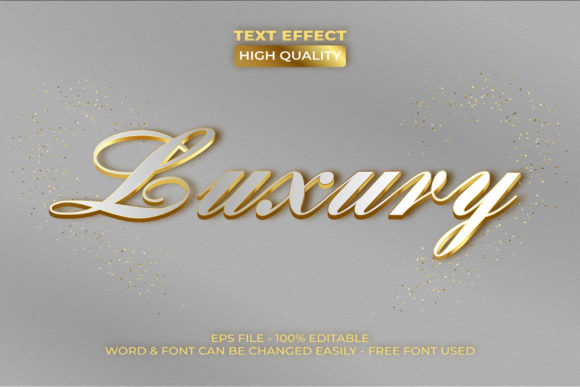
This is where the Gold Text Effect Luxury Style Theme comes in. It's important to clarify what this asset is and isn't. It’s not a traditional typeface or font file. Instead, it’s a sophisticated set of pre-configured Adobe Illustrator graphic styles. Think of it as a filter or a layer style, but one that’s been meticulously crafted to produce a photorealistic, multi-dimensional gold effect. You simply type your text using any font you have, select it, and click the desired style from your Graphic Styles panel. The effect is instantly applied, transforming ordinary letters into gleaming, luxurious headlines. The package includes both .AI and .EPS files, making it fully compatible with Adobe Illustrator CC and above, and ready for both print and digital projects.
Why a Metallic Finish Elevates Visual Communication
The appeal of a gold text effect goes beyond mere decoration. It serves a strategic purpose in visual communication. In a crowded marketplace, a subtle metallic sheen can be the difference between a design that gets glanced at and one that gets remembered. This style taps into deep-seated psychological associations with quality, success, and exclusivity. When used on a brand's logo or packaging, it immediately sets a premium tone, suggesting that the product or service inside is of a higher caliber. It’s a visual shorthand for "this is worth your attention."
For social media graphics and website banners, this effect cuts through the noise. A gold-accented headline for a webinar, a product launch announcement, or a special offer instantly conveys importance and urgency. It adds a layer of tactile realism in a digital space often dominated by flat design, making your content feel more substantial and valuable. In editorial design, a gold drop cap or pull quote can anchor a page, guiding the reader's eye and adding a touch of classic sophistication to a modern layout. The key is that it’s a tool for emphasis, helping to establish hierarchy and direct focus where you want it most.
From Brand Identity to Wedding Invitations: Practical Applications
The versatility of a well-executed gold effect theme is one of its greatest strengths. Its applications span across industries and project types, making it a valuable addition to any designer's toolkit.
- Branding & Logo Design: For businesses in the beauty, fashion, consulting, or luxury goods sectors, incorporating a gold effect into a logotype or brand mark can instantly solidify a high-end positioning. It works beautifully for monograms, taglines, or the primary wordmark.
- Packaging Design: Think of a cosmetic box, a gourmet food label, or a bottle of premium spirits. A gold foil effect on the product name or brand adds tangible perceived value, making the product feel more gift-worthy and special on the shelf.
- Digital & Social Media: Create scroll-stopping graphics for Instagram stories, YouTube thumbnails, or Facebook ads. A "Limited Time Offer" or "New Collection" announcement rendered in gold has a higher chance of engagement. It’s also perfect for creating cohesive, branded templates for your content.
- Print & Merchandise: The effect translates beautifully to print. Use it for business cards, letterheads, posters, and event invitations. For merchandise like tote bags, mugs, or apparel, a gold graphic style can turn a simple design into a premium, desirable item.
- Editorial & Web Design: Add a luxurious flair to magazine layouts, book covers, or website hero sections. It can be used for chapter titles, section headers, or key quotes to enhance the reading experience and convey authority.
The Gold Text Effect Luxury Style Theme allows you to maintain this high-end aesthetic consistently across all these touchpoints, which is fundamental to building strong brand recognition.
Integrating a Premium Effect Into Your Workflow
Adopting a new design asset should streamline your process, not complicate it. The beauty of this Illustrator-based solution is its simplicity. You are not locked into a single typeface. You can pair the luxurious gold effect with a bold sans-serif font for a modern, clean look, or with an elegant serif font for a more traditional, editorial feel. This flexibility is crucial for maintaining your unique brand voice while still leveraging the power of a metallic finish.
Here are a few practical tips for getting the most out of it:
- Start with a Strong Typeface: The effect enhances the font; it doesn’t replace good typography. Choose a font that is well-designed and appropriate for your message. A highly decorative script might become unreadable, whereas a solid, clear typeface will shine.
- Consider Context and Contrast: A gold effect works best against a dark or rich background—think deep navy, black, charcoal, or even a deep emerald green. This contrast makes the gold pop and ensures legibility. On a light background, it may appear washed out.
- Use for Emphasis, Not Entire Paragraphs: Like any strong design element, gold is most effective when used sparingly. Apply it to headlines, short phrases, logos, or icons. Using it on long blocks of body text would be overwhelming and difficult to read.
- Test for Commercial Use: Always verify the licensing of any design asset. The included files should come with clear terms, typically allowing for use in both personal and commercial projects, which is essential for entrepreneurs and businesses.
- Customize and Experiment: Once applied, you can often adjust the underlying color or add additional effects in Illustrator to create variations, such as rose gold or silver, expanding the utility of the single asset.
Ultimately, tools like the Gold Text Effect Luxury Style Theme are about empowering you to execute your creative vision more efficiently. They bridge the gap between a professional concept and a polished final product, allowing you to focus on the message and strategy behind your design. By applying a touch of gold with intention and restraint, you can transform your projects, communicate value more effectively, and create visuals that truly resonate with your audience.