6 Shiny Chrome Text Effects: A Designer's Shortcut to Cool Metallic Style
There's something undeniably captivating about chrome. It's sleek, modern, and carries an inherent sense of value and precision. For designers and creators, achieving that perfect metallic finish on text, logos, or shapes can be a complex, time-consuming process. What if you could skip the intricate layer styles and get that polished, high-impact chrome look in minutes? That's the promise of a well-crafted set of chrome text effects, designed to transform your typography into stunning metallic statements with minimal effort.
What Exactly Are Chrome Text Effects?
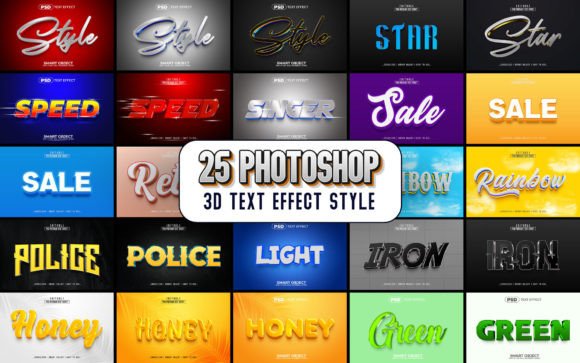
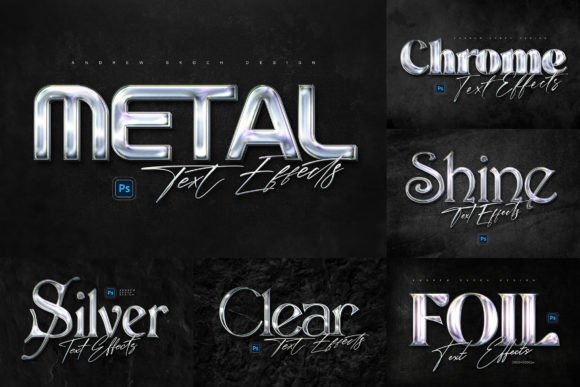
Think of them as professional-grade templates for Adobe Photoshop. Instead of building a complex chrome effect from scratch—adjusting bevels, contours, and multiple gradient layers—you start with a ready-made, photorealistic foundation. This particular set offers six distinct styles, each with its own personality, from a classic polished chrome to more textured, industrial finishes. The magic lies in the use of Smart Objects. You simply double-click the Smart Object layer, paste in your text or logo design, save, and the effect automatically applies to your artwork. It’s a non-destructive workflow that preserves the integrity of the original effect, allowing for endless experimentation.
The visual appeal is immediate. Chrome effects catch the light in a way that feels three-dimensional and tangible. They add depth, contrast, and a premium feel that flat colors often can't achieve. On dark wall textures—like the gritty concrete or brushed metal backgrounds included in the example files—the chrome truly pops, creating a dramatic, cinematic quality perfect for a wall sign effect. This isn't just about making text shiny; it's about creating a specific mood and visual impact.
Practical Applications for a Metallic Finish
The versatility of a high-quality chrome effect is where its real value shines. It’s a design asset that can elevate projects across numerous mediums. For branding and logo design, a chrome finish can convey innovation, technology, luxury, or strength. It’s particularly effective for automotive brands, tech startups, fitness brands, or any business wanting to project a cutting-edge image. The effect ensures your mark is memorable and visually consistent across all touchpoints.
When it comes to social media graphics, standing out in a crowded feed is crucial. A chrome-styled headline on a Facebook cover or YouTube banner instantly grabs attention and communicates a high level of production value. It works exceptionally well for announcements, product launches, or channel intros. For web design, using chrome on key headings or call-to-action buttons can guide the user's eye and create focal points, enhancing the overall user experience and professional presentation.
Don't overlook print and physical applications. The high 300 DPI resolution of these templates makes them suitable for creating striking posters, flyers, and even merchandise designs. Imagine a motivational poster for a home gym with chrome text, or a sleek event invitation for a tech conference. The effect translates beautifully to physical formats, maintaining its sharp detail and metallic realism. For editorial layouts or digital products like e-book covers, chrome titles can signal quality and authority, potentially boosting audience engagement and perceived value.
Getting the Most from Your Metallic Typography
While the template does the heavy lifting, a few thoughtful considerations will ensure your final design is cohesive and effective. First, choose the right style for your project's goal. The six included styles offer variety. A highly reflective, clean chrome might suit a luxury product, while a more textured, brushed metal could fit an industrial or vintage-inspired project. Review the example JPGs to see each style in context.
Font choice is critical. The effect applies to whatever you place inside the Smart Object. Bold, sans-serif fonts like Bebas Neue or Oswald often work best, as their strong letterforms provide a solid canvas for the metallic details. However, a carefully chosen serif or even a clean script can look stunning. The help file includes free font download links, so you can experiment with the exact typefaces used in the previews. Always test readability—while chrome is eye-catching, ensure your message is still easily legible at the intended size, especially for body text or smaller applications.
Consider the background context. These effects are designed to work on dark, textured backgrounds to mimic a real-world wall sign. Placing chrome text on a busy, colorful background might diminish its impact. Use solid dark colors, subtle gradients, or the provided textures to make the chrome the star of the show. Finally, think about font pairing. If using chrome for a headline, pair it with a simple, clean sans-serif or serif font for supporting text to maintain visual hierarchy and avoid a cluttered look.
A Streamlined Asset for Modern Creators
In a fast-paced creative environment, efficiency without sacrificing quality is key. This set of chrome text effects is more than just a filter; it's a time-saving design asset that delivers a premium, professional result. The organized layers and clear instructions make it accessible even for those newer to Photoshop, while the customization potential satisfies experienced designers.
Whether you're a small business owner crafting your brand identity, a content creator developing engaging social media visuals, or a designer working on client projects, having such a versatile tool in your library can spark inspiration and streamline your workflow. It allows you to present your text, shapes, or logos in a cool metallic style that resonates with contemporary audiences, helping to improve visual consistency and brand recognition. The included commercial license offers peace of mind for using the effects in both personal and professional projects, making it a practical and valuable addition to any creative toolkit.