Ignite Your Typography: Mastering the Fire Text Effects Toolkit
Every designer hits a creative wall eventually. You're staring at a blank canvas, tasked with creating a logo for a new energy drink, a thumbnail for a gaming stream, or a poster for a Halloween event. The brief calls for something powerful, aggressive, and impossible to ignore. You need typography that doesn't just sit on the page—it needs to burn through it. This is where the visual language of fire becomes an invaluable asset. It's a universal symbol of energy, passion, danger, and transformation. But achieving a realistic, high-impact fiery effect from scratch in Photoshop can be a time-consuming process of layering brushes, adjusting blend modes, and wrestling with lighting. That's precisely the problem the Fire Text Effects toolkit was built to solve.
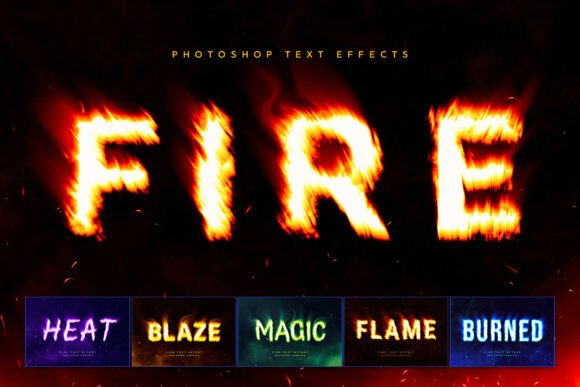
This premium collection of Photoshop templates is more than just a set of brushes; it's a complete production system. The core appeal lies in its ability to deliver a cinema-ready title screen in seconds. By leveraging Smart Objects, the workflow is incredibly streamlined. You double-click a layer, swap in your own text or vector logo, and save. The system does the heavy lifting, instantly generating the intricate details that make the effect believable: volumetric lighting that makes the flames glow from within, heat distortion waves that ripple the air, and atmospheric dark smoke overlays that add depth and realism. It’s this combination of ease-of-use and professional-grade output that makes it a standout tool for any creative professional's arsenal.
Beyond Orange Flames: The Chemistry of Style
What truly sets this toolkit apart is its understanding that "fire" isn't a one-note concept. The inclusion of six distinct chemical style variations acknowledges the diverse emotional and thematic needs of modern projects. While the classic orange embers are perfect for raw energy and heat, the other options open up new creative possibilities. The mystical green glow, for instance, is ideal for fantasy game logos, Halloween designs, or anything with a toxic or magical theme. The ethereal blue fire suggests something colder, more technical, or even supernatural—think sci-fi interfaces, ice-themed branding, or a high-tech sports team emblem. This variety ensures you're not locked into a single aesthetic. You can match the fire effect to the precise mood of your brand identity, whether it's aggressive, mysterious, or futuristic.
Real-World Applications: Where Fire Meets Function
Understanding the tool is one thing; knowing where to deploy it is what separates a good design from a great one. The practical uses for this fire text effect span nearly every corner of the visual communication landscape. For small business owners and entrepreneurs, it’s a secret weapon for creating standout branding assets without a huge budget. Imagine a local barbecue restaurant using a smoky, ember-lit version of its name on menus and signage. A craft brewery could use a deep amber flame effect for a limited-edition stout label. These aren't just decorative touches; they communicate flavor, passion, and quality at a glance.
For content creators and marketers, the toolkit is a game-changer for social media graphics. A YouTube thumbnail with blazing text demands a click in a crowded feed. An Instagram story promoting a sale or new product launch gains instant urgency with fiery typography. It’s equally effective for digital products like podcast artwork, webinar title slides, or eBook covers in the thriller or action genres. In the realm of print and merchandise, the applications are just as powerful. Streetwear apparel art thrives on bold, graphic statements, and a fiery logo placement on a hoodie or t-shirt is a classic that sells. Movie posters, club event flyers, and even dramatic wedding invitations for a themed ceremony can leverage this intense visual language to set the perfect tone.
Integrating Fire into Your Design Workflow
Adopting any new design asset requires a thoughtful approach to ensure it enhances, rather than overwhelms, your project. The first step is choosing the right style from the six available. Don't default to the brightest orange; consider the psychology of color. A blue flame might better suit a tech brand, while a green one could elevate a gaming logo. This is where your role as a designer or brand strategist comes in—matching the visual tool to the project's core message.
Next, consider typography pairing. A blazing fire effect will naturally dominate the visual hierarchy. Pair it with a clean, simple sans-serif font for supporting text to maintain readability. Avoid combining it with other highly decorative fonts, as this can create visual chaos. Test your chosen font within the Smart Object layer; sometimes a bold, condensed typeface holds the effect better than a delicate script. The goal is a harmonious balance where the fire enhances the message, not obscures it. Always review the final composition at different sizes to ensure legibility, especially for smaller applications like social media profile pictures or favicon-sized logos.
From Asset to Advantage: Elevating Your Creative Output
Ultimately, tools like the Fire Text Effects collection are about efficiency and professional polish. They allow a solo entrepreneur to compete with the production value of larger agencies and give a marketing team the ability to produce high-impact assets quickly for campaign bursts. The key is to use them as a starting point for creativity, not a finished product. Experiment with the layer styles within the PSD file—adjust the color balance, tweak the opacity of the smoke overlays, or combine elements from different style variations to create something uniquely yours.
Remember that commercial licensing is part of the value proposition. The included PDF with font links and instructions is crucial, not just for setup, but for understanding the terms of use for your specific project, whether it's for a client's brand or your own merchandise line. By integrating this toolkit thoughtfully into your process, you transform a cool visual effect into a strategic asset. You gain the ability to consistently produce designs that grab attention, communicate emotion, and leave a lasting, fiery impression on your audience.