Whimsical Unicorn Invites: Designing a Magical First Birthday
Celebrating a child's first trip around the sun is a milestone that deserves a touch of magic. For many parents, the unicorn theme represents a world of wonder, pastel dreams, and enchanting possibilities. But transforming that dream into a tangible invitation that captures the excitement of the day can feel overwhelming, especially when you're already juggling party planning. This is where the right design asset becomes your secret weapon. A well-crafted template doesn't just save you time; it provides a professional, cohesive foundation that lets your personal vision shine through without the stress of starting from a blank canvas.
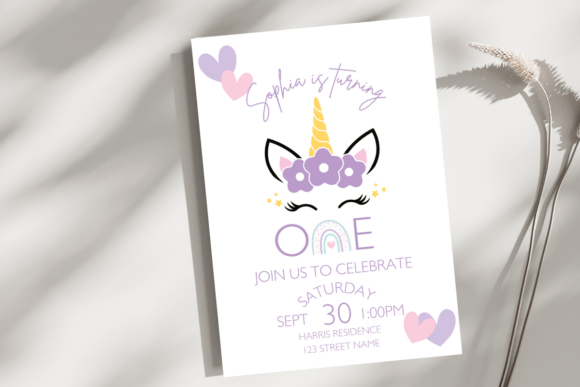
Imagine having a beautifully designed, fully customizable invitation suite at your fingertips, ready to be personalized with your child's name, party details, and even your own photos. The Unicorn First Birthday Invite Template is exactly that—a versatile Canva-editable package designed for modern parents and creative entrepreneurs. It includes two key pieces: a classic 5x7" birth announcement perfect for printing and mailing, and a vibrant 1080x1920 pixel digital phone invite optimized for social media stories and direct messaging. This dual-format approach ensures your celebration details look impeccable whether held in hand or viewed on a screen.
Beyond the Invite: Unpacking the Editable Canva Experience
The true power of this template lies in its seamless integration with Canva, a tool beloved by designers, small business owners, and hobbyists for its accessibility. Upon purchase, you receive two PDF files containing direct links. One click loads the 5x7 announcement directly into your Canva workspace; another loads the digital phone version. This eliminates confusing file conversions or software downloads. You're immediately working within a familiar, user-friendly interface where every element is at your command.
This level of control is what separates a generic template from a premium design asset. You aren't just changing text; you're refining the entire visual language of the invitation. Consider these practical applications:
- Font Personalization: Swap the default script font for a playful sans serif or a whimsical handwritten font from Canva's vast library to match your party's specific vibe.
- Color Harmony: Adjust the font colors and background hues to align perfectly with your chosen party palette, from soft lavender and mint to bold rainbow accents.
- Photo Integration: The template allows for photo uploads. Imagine placing a sweet, smiling portrait of your one-year-old right on the invite, making it an instant keepsake.
- Sizing and Layout: Easily tweak font sizes for emphasis, ensuring the most important details—like the date, time, and RSVP information—stand out clearly.
This process mirrors professional editorial design and packaging design workflows, where a strong template ensures visual consistency and brand recognition. For a first birthday, your "brand" is the party theme itself. Using this template guarantees that every touchpoint, from the initial invite to thank-you cards, speaks the same magical language.
From Personal Celebration to Commercial Venture
While this template is a lifesaver for parents, its applications extend far into the realm of commercial font and design asset use. If you are a graphic designer, event planner, or Etsy shop owner, this editable file is a valuable addition to your toolkit. You can create and sell customized invitations for clients, using the template as a base to build upon. The included licensing should always be reviewed, but the ability to modify and present a professional-grade design is a significant time-saver and value-add for your services.
Think about the broader brand identity you can build. The whimsical, modern typography of the unicorn theme can inspire a suite of marketing assets. Use the same color scheme and font pairings to design social media graphics for the party countdown, printable bunting for the dessert table, or even a custom logo for the event. This cohesive approach elevates a simple gathering into a fully realized, professionally presented experience.
Practical Design Tips for Your Magical Creation
As you dive into editing, keep these practical considerations in mind to ensure your final product is both beautiful and functional:
- Readability is Key: While a fancy script font looks stunning for the headline, ensure all critical details (address, phone number) use a clean, legible sans serif font. Test the invite by sending a preview to your phone and printing a test copy.
- Mindful Font Pairing: A great rule of thumb is to pair a decorative display font with a simple, neutral body font. The template likely has a suggested pairing, but feel free to experiment. Limit yourself to two or three font styles maximum to avoid a cluttered look.
- Whitespace is Your Friend: Don't feel obligated to fill every inch. Ample negative space makes the design feel airy and elegant, drawing the eye to the essential information.
- Check Commercial Use: If you plan to use this template to create products for sale, double-check the terms of use for the original template and any new fonts or graphics you incorporate from Canva.
The goal is to create an invitation that sparks joy and sets the tone for a wonderful celebration. By leveraging a structured, editable template, you bypass the technical hurdles and dive straight into the creative, fulfilling part of the design process. It’s about using smart tools to bring your unique vision to life, ensuring the first chapter of your child's story is told with the magic and care it deserves.